
Yarn Out 3D
Unico StudioPuzzle
4.7453.00 Reviews
- Version
- 1.5
- Installs
- 100.00K
- Age Rating
- Everyone
Screenshots
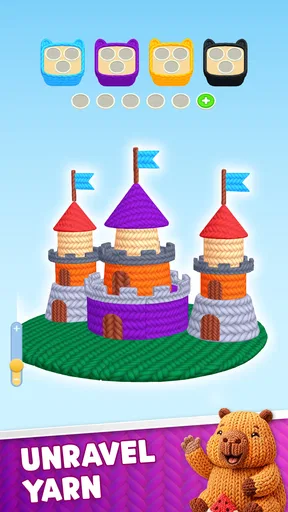
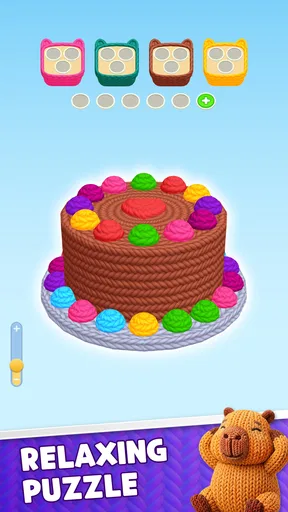
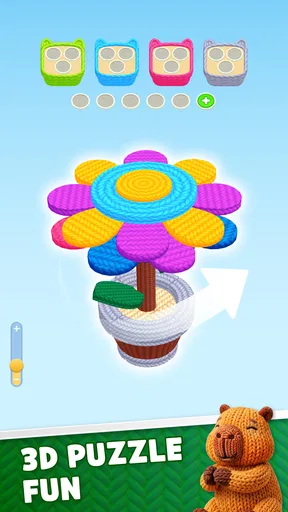

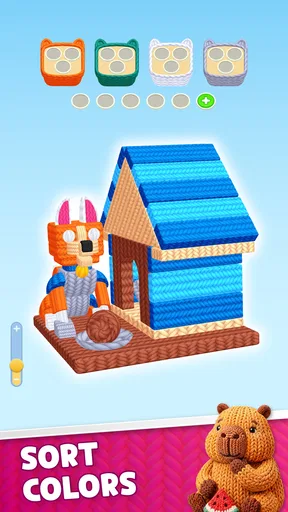
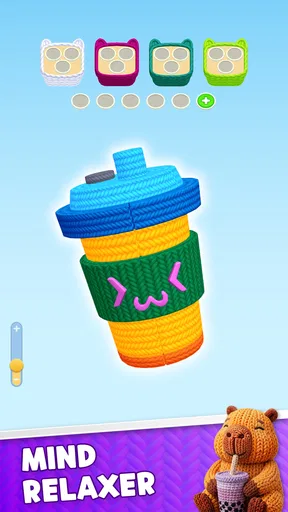


Our Review of Yarn Out 3D
 Analysis by Appyee
Some puzzle games ask you to think several moves ahead, while others mainly test whether you can stay patient when the screen becomes crowded. Yarn Out 3D sits in the second group, but with enough spatial reasoning to keep it interesting. I found its central idea easy to understand: untangle yarn loops by working through a three-dimensional arrangement, then clear the puzzle without letting the visible mess dictate every move.
Yarn Out 3D is a free puzzle game from Unico Studio, aimed at Everyone and available for devices running Android 7.0 or later. Its average rating is 4.7 from around 13 thousand ratings, and it has passed 100 thousand installs. Those figures suggest that the simple yarn theme has found an audience, but they do not tell you whether it matches your preferred kind of puzzle. In my experience, the important question is whether you enjoy careful visual sorting more than rapid action or story-driven progression.
What the first few sessions reveal
The opening appeal is immediate because the objective is visual. You look at loops, identify what seems trapped or crossed, and try to expose a sensible path through the arrangement. There is no need to learn a complicated control system before making progress. That makes the game approachable for a quick break, especially when I want something more active than a passive time-filler but less demanding than a competitive game.
The first place players may get stuck is not necessarily a difficult puzzle. It is often the assumption that the most visible loop should be moved first. In a three-dimensional puzzle, the outermost-looking piece can be part of a larger obstruction, while a less obvious loop may be the one that opens the whole arrangement. I had better results when I paused before touching anything and traced the apparent route of each strand from its exposed end to the point where it disappeared.
That small change in approach matters. Instead of treating the board as a collection of individual pieces, I began reading it as a set of dependencies. If one loop crosses another, I ask which one can move without tightening the surrounding structure. This is a useful habit for Yarn Out 3D because the challenge comes from order and visibility rather than from memorizing rules.
The three-dimensional presentation can also create false difficulty. A loop may look blocked simply because the viewing angle hides an opening. Before deciding that a puzzle requires a risky move, I recommend rotating the scene slowly and checking the space behind and beneath the visible yarn. Changing your viewpoint is often a solving tool, not just a cosmetic gesture.
That is one of the more practical lessons I took from the game. Players who rush may interpret a visual blind spot as an impossible arrangement. Players who inspect the board from more than one angle are more likely to notice a harmless route. This is especially useful on a small phone screen, where overlapping colors and depth can be harder to distinguish than they would be on a larger display.
Small setup checks that prevent avoidable frustration
Because the game is free, it is easy to install it casually and begin playing without thinking about the device environment. I would still make a few simple checks first. Confirm that the phone meets the Android 7.0 minimum, keep the operating system reasonably current, and make sure there is enough free storage for a new game and its normal updates. These are ordinary precautions, but they remove several avoidable causes of trouble before you start blaming the puzzles.
If the game opens slowly or the board does not appear correctly, I would first close other demanding apps and reopen it. A clean restart is more useful than repeatedly tapping the same control. If the issue continues, checking whether the app is on its current version is sensible; the listed version is 1.2. I would also avoid judging the game during the first seconds after launching if the phone is busy completing background tasks.
Touch accuracy deserves attention too. Yarn puzzles depend on selecting the intended loop, so a dirty screen, a thick protective film, or a finger placed slightly away from the visible object can feel like a game problem. I found it helpful to tap near the center of the strand or loop rather than at a narrow edge. When several pieces overlap, waiting for the board to settle visually before selecting one reduces accidental choices.
There is another setup issue that is easy to overlook: attention. This is not a game I enjoy while walking, commuting through a crowded station, or switching constantly between messages. The puzzles may be casual, but the visual relationships are not. A quiet minute with the phone held steady gives me a better experience than trying to solve a tangled arrangement while distracted.
Since the game is free to start, it is also worth remembering that optional purchases range from $0.99 to $99.99 per item. I would review purchase controls before handing the phone to a child, even though the content rating is Everyone. That is not a criticism of the puzzle design; it is simply good practice for any free game that offers in-app purchases.
A recovery routine when a puzzle feels impossible
My most useful recovery routine begins with stopping rather than undoing moves at random. I look for the loop that has the clearest open path, then check whether removing it would expose another crossing. If nothing looks safe, I rotate the arrangement and inspect it from a lower angle. The goal is to gather information, not to force progress.
When I lose track of the board, I mentally label pieces by position rather than by color alone: front-left, rear-right, upper layer, and so on. This is surprisingly effective when several yarn sections have similar shades. Color can attract the eye, but location tells me which object is actually blocking another. That method also reduces the temptation to repeat the last failed move simply because it was easy to identify.
A second recovery technique is to make one deliberate move and then reassess the entire arrangement. I do not plan a long chain unless the relationships are obvious. In a compact three-dimensional puzzle, a move that looks beneficial from one angle may create a new obstruction elsewhere. Short planning cycles keep mistakes understandable and make it easier to learn from them.
If the controls appear unresponsive, I separate a gameplay mistake from a technical issue. First I try a different, clearly exposed loop. If that responds, the original object may have been blocked or too close to another touch target. If nothing responds, I pause, close the game, and relaunch it. I would not repeatedly press the screen or rapidly switch applications, because that makes it harder to tell whether the problem is selection, performance, or simple visual confusion.
This is also where patience pays off. A puzzle can feel broken when the real issue is that the chosen strand has no legal route yet. I prefer to test the least committed action first: inspect, rotate, select an exposed section, and observe. That workflow is slower than guessing, but it produces fewer restarts and makes the game feel more like a logic exercise than a trial-and-error contest.
When the phone, connection, or surroundings are the real problem
Not every unpleasant session is caused by the game itself. If the display is stuttering across several apps, the phone may be under general load. Closing background applications and restarting the device can help identify that difference. If only this game behaves strangely, checking its version and reopening it is a reasonable next step before making a stronger judgment.
Network conditions can also complicate free games, particularly around store access or any part of the experience that needs a connection. If the game will not install or an update does not complete, I would check the connection, available storage, and the device's compatibility before assuming the puzzle content is at fault. A failed download is not evidence that the core game is poor.
Screen size changes the experience more than I expected. On a compact phone, a dense yarn arrangement can make taps feel imprecise even when the controls are functioning. I get better results by holding the device closer, cleaning the display, and avoiding one-handed play when the board contains many overlapping strands. On a tablet or larger phone, the same puzzle may be easier to read, although the underlying logic remains unchanged.
Notifications are another hidden source of friction. A banner appearing while I am tracing a loop can break my visual memory of what crosses what. For a focused session, I prefer a short period with notifications silenced. This is not necessary for a casual player, but it is valuable when a puzzle has reached the point where one missed relationship causes several wasted moves.
I would also avoid using battery-saving settings as the first explanation for every delay. They can affect how aggressively a device handles background activity, but a single slow response does not prove that the game is malfunctioning. Reproducing the issue after a restart, with other apps closed, gives a much clearer picture. That kind of basic troubleshooting is enough for most ordinary interruptions without turning a small puzzle into a technical project.
How it compares with familiar puzzle alternatives
Compared with a traditional match-three game, Yarn Out 3D is less about creating chains under time pressure and more about understanding spatial order. I prefer it when I want to examine a board and make a considered decision. Someone who enjoys constant effects, rapid combinations, or a strong score-chasing loop may find the yarn puzzles too quiet.
It also differs from word puzzles. A word game rewards vocabulary and pattern recognition, while this one rewards visual tracking and restraint. That makes it a useful alternative for players who are tired of letters but still want a short mental challenge. The trade-off is that visual clutter can be more tiring than a clean grid of words, especially after a long day.
Compared with classic flat logic puzzles, the extra dimension gives the game its identity. A simple grid lets me see most relationships at once; here, I may need to rotate the arrangement and inspect hidden overlaps. That creates satisfying moments when a blocked-looking section suddenly becomes clear. It also means the game is less suitable for people who dislike perspective-based interaction or who want every rule represented in a perfectly visible diagram.
The yarn theme makes the experience friendlier than many abstract logic games, but it does not remove the need for concentration. I can recommend it to a family member who wants an approachable puzzle, provided they are comfortable with the fact that “easy to start” does not always mean “easy to finish.” The Everyone rating supports its broad accessibility, while the visual nature of the challenges determines whether a particular player will enjoy it.
Who will get the most from the yarn puzzles
I think the best audience is someone who likes short, self-contained reasoning tasks and does not need a story, a competitive leaderboard, or elaborate progression to stay interested. It works well for a coffee break, a quiet wait, or a few minutes before bed. I especially like it for moments when I want to focus on one problem rather than scroll through several unrelated distractions.
A realistic everyday scenario would be a train journey with an unreliable signal. I can open a puzzle, study the arrangement, and use the ride as a chance to work through a visual problem at my own pace. If the carriage becomes crowded or the phone is difficult to hold steady, I would pause rather than forcing a move. The game suits interrupted attention better than a timed action title, but it still rewards a stable viewing angle.
I would be more cautious recommending it to players who need a strong sense of long-term achievement. The appeal here is in solving the current arrangement, not in assuming that every player wants a deep narrative or a broad collection of systems. Likewise, anyone who becomes frustrated by trial-and-error interactions should use the inspection and rotation habits described above, or choose a more transparent flat-grid puzzle instead.
Parents should also distinguish the age rating from purchase settings. The game is suitable for Everyone, but optional purchases can cost from $0.99 to $99.99 per item. I would enable the device's purchase protections before letting a child play independently. That keeps the decision about spending separate from the question of whether the puzzles themselves are age-appropriate.
My practical verdict after using it
Yarn Out 3D succeeds because it gives a familiar tangle a clear logic-game structure. I enjoy the moment when a messy arrangement becomes readable after a careful rotation, and I appreciate that the basic idea can be understood without a long tutorial. The strongest part is not speed; it is learning to distinguish what is truly blocked from what is merely hidden by perspective.
Its main friction is the same feature that makes it distinctive. Three-dimensional yarn can be visually confusing, and a small screen or hurried tap may make a solvable puzzle feel unfair. The game is a better fit for patient players who are willing to inspect the board than for anyone looking for instant reactions. I also treat the free-to-start model thoughtfully because in-app purchases are available, even though the game itself costs nothing to download.
Unico Studio has made a puzzle that I would keep installed for quiet, focused breaks rather than constant all-day play. The current version is 1.2, and the Android requirement of 7.0 or later makes it accessible to many older devices. If you like untangling visual problems, want something gentler than a timed arcade game, and are comfortable rotating a board to find the real opening, I think it is worth trying.
My recommendation is more reserved for players who want a story, fast competition, or completely flat layouts with no hidden angles. For everyone else, the best way to approach it is simple: keep the screen clear, inspect before tapping, rotate when the answer seems impossible, and recover from mistakes one move at a time. With that mindset, the yarn stops looking like random clutter and starts behaving like a puzzle you can genuinely reason through.
Verdict
Strengths of Yarn Out 3D
- Simple tap-and-drag controls are easy for beginners to learn.
- Short levels make it convenient for quick gaming sessions.
- Colorful 3D visuals make the yarn puzzles pleasant to watch.
- Gradually harder layouts provide a steady learning curve.
- Offline play is useful when you have no internet connection.
Limitations of Yarn Out 3D
- Some levels may feel repetitive after extended play.
- The game can become too easy for experienced puzzle players.
- Hints or extra moves may be limited without watching ads.
- Ads can interrupt the experience between completed levels.
- The 3D perspective may occasionally make yarn paths hard to judge.
Other Releases by Unico Studio
View All
Brain Test 2: Tricky Stories
Trivia4.7

Brain Test: Tricky Puzzles
Trivia4.7

Who is? Brain Teaser & Riddles
Trivia4.7

Brain Test 3: Tricky Quests
Trivia4.7
Similar Picks in This Category
View All
Block Blast!
HungryStudio4.8

Braindom: Brain Games Test
Lahana Game Studio4.6

AMAZE!
CrazyLabs LTD4.6

Sudoku - Classic Sudoku Puzzle
Oakever Games4.7

Art Puzzle - Puzzle Games
Easybrain4.8

Amaze GO!
Oakever Games4.9
Frequently Asked Questions
What is Yarn Out 3D and how is it played?
Yarn Out 3D is a casual puzzle game focused on untangling colorful yarn and organizing connected strands. Each level presents a compact 3D arrangement where you must inspect the knots, move pieces in the correct order, and clear the yarn without creating additional tangles. The controls are generally simple, making it easy to start, although later stages require patience, planning, and careful observation rather than quick reflexes.
Is Yarn Out 3D free to download and play?
Yarn Out 3D can generally be downloaded for free, allowing players to try the main gameplay without an upfront purchase. However, free mobile games commonly include advertising, optional in-app purchases, or both. Ads may appear between levels or when requesting extra assistance, while purchases can sometimes remove advertisements or provide bonuses. Check the store listing on your device for the current pricing and monetization details.
Does Yarn Out 3D require an internet connection?
The basic puzzle experience in Yarn Out 3D may work without a constant internet connection, which is convenient for short sessions while traveling or when mobile data is unavailable. Nevertheless, certain functions can depend on connectivity, including advertisements, purchases, cloud features, updates, or promotional rewards. Availability may also differ between versions, so it is best to test the game in airplane mode after installation.
Is Yarn Out 3D suitable for children and casual players?
Yarn Out 3D is designed around straightforward touch controls and colorful visual presentation, so it can appeal to casual players and families. The early puzzles are usually easy to understand, but increasing complexity may challenge younger children and require help with planning. Parents should still review the app’s age rating, advertising, privacy information, and purchase settings before allowing children to play independently.
Are there hints, boosters, or advertisements in Yarn Out 3D?
The game may offer helpful features such as hints, undo actions, or other assistance when a puzzle becomes difficult. These tools can make progression more accessible, but they may be limited, earned through gameplay, unlocked by watching an advertisement, or connected to optional purchases. Advertising can also appear during normal play. If you prefer uninterrupted sessions, review the available ad-removal option and purchase settings before spending money.
Play our best games!


